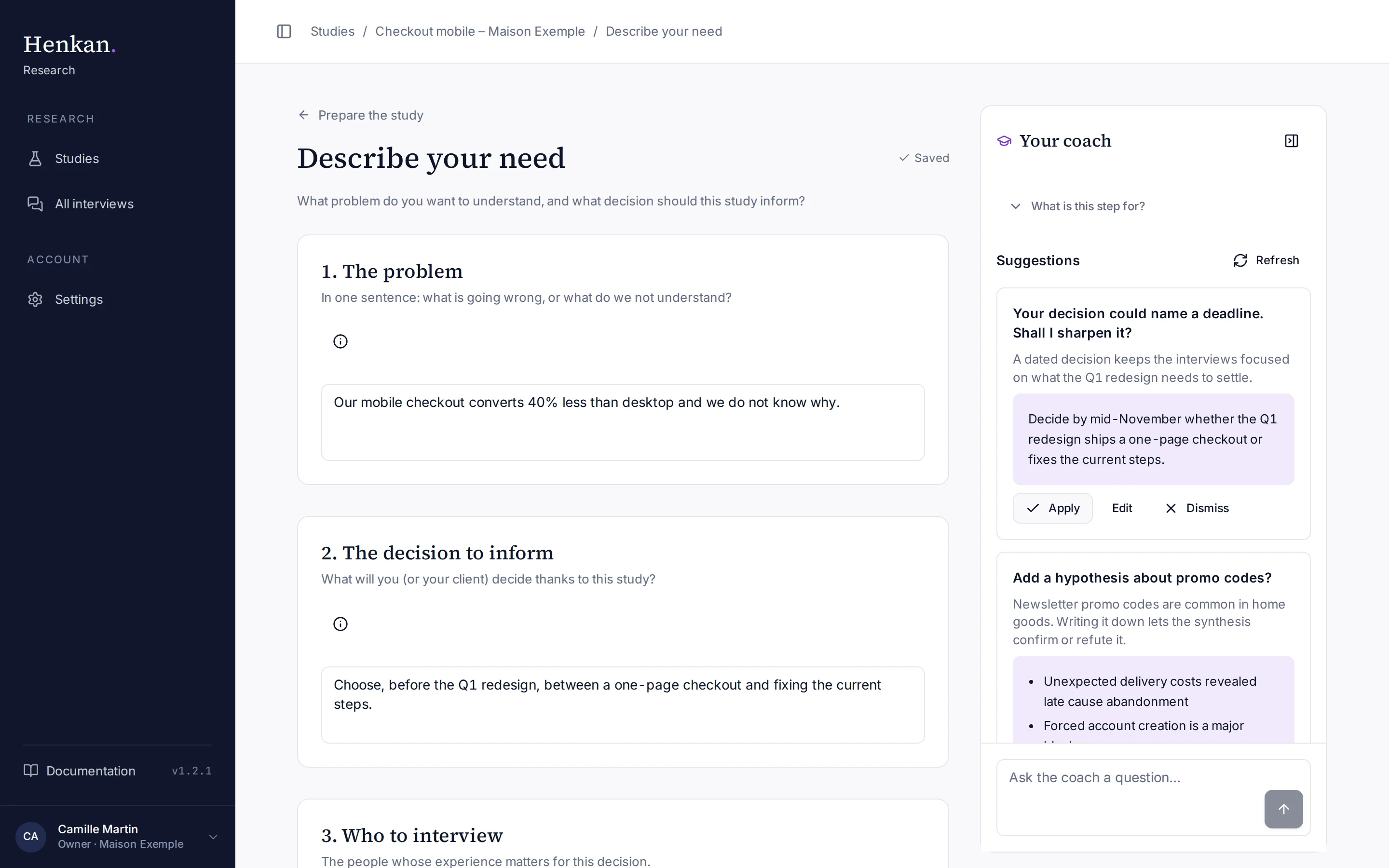
The first step frames the whole study. The AI uses it to keep interviews focused, and the synthesis is organised around your objectives and hypotheses.
1
The problem. One sentence. The info icon explains why each field matters.
2
Objectives. Two to five, each starting with a verb.
3
Coach suggestion. A proposed change, written for you.
4
Apply. Writes the proposal into the field. Edit lets you change it first.
5
Save indicator. Every change is saved automatically.
The five sections#
| Section | What to write | Example from the demo |
|---|---|---|
| 1. The problem | In one sentence, what is going wrong or what you do not understand. | Our mobile checkout converts 40% less than desktop and we do not know why. |
| 2. The decision to inform | What you or your client will decide thanks to this study. | Choose, before the Q1 redesign, between a one-page checkout and fixing the current steps. |
| 3. Who to interview | The people whose experience matters for this decision. It also guides recruitment advice. | Customers who bought on mobile in the last three months, some of whom abandoned a cart. |
| 4. What you want to learn | Two to five objectives starting with a verb: understand, identify, assess. | Identify the moments where customers hesitate or abandon. |
| 5. Hypotheses | What you already believe and want to check. | Unexpected delivery costs revealed late cause abandonment. |
Write objectives and hypotheses#
- Add an item Select Add an objective or Add a hypothesis. Each item is numbered.
- Or ask the coach When a list is empty, Generate with the coach opens the coach and refreshes its suggestions. A suggestion can propose a complete list that you apply in one click.
- Remove an item Use the bin icon next to it.
Next step#
Prepare the questions: turn your objectives into topics for the AI to cover.