You prepare the topics to cover, not a fixed questionnaire. The AI starts each topic with your opening question, follows what the person says, asks follow-ups based on your instructions and makes sure every required topic is covered.
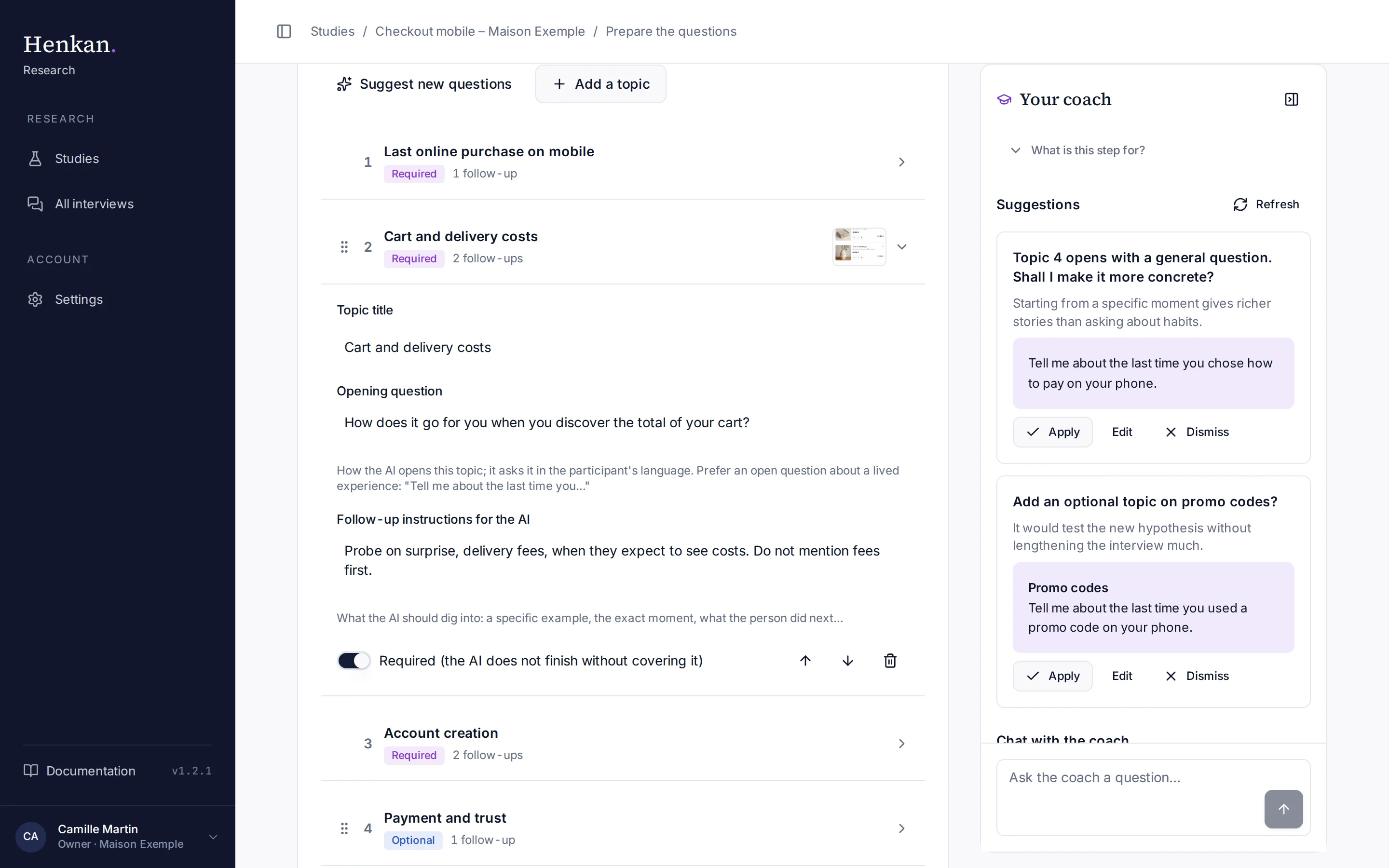
1
Suggest new questions. The AI drafts a complete guide from your need.
2
A topic. Select it to open or close it. Drag the card to reorder.
3
Opening question. How the AI opens the topic.
4
Follow-up instructions. What the AI should dig into.
5
Coach suggestion. For example a more concrete opening question.
Generate a first guide#
- Open the step From the checklist, open Prepare the questions.
- Generate Select Prepare the questions with AI (or Suggest new questions when topics already exist). The AI writes a context paragraph and four to seven topics from your need and target length.
- Confirm If topics already exist, you are asked to confirm before they are replaced.
- Review Open each topic and adjust it. Everything is editable.
Edit a topic#
| Field | What it does |
|---|---|
| Topic title | A short name, used in the guide, the progress bar and the synthesis. |
| Opening question | How the AI opens the topic. Prefer an open question about a lived experience: "Tell me about the last time you…". The AI asks it in the participant's language. |
| Follow-up instructions for the AI | What to dig into: a specific example, the exact moment, what the person did next. The card shows how many follow-ups you wrote. |
| Required | The AI does not finish the interview without covering a required topic. Optional topics are dropped if time runs short. |
Use the arrows to move a topic up or down, or drag the card. The bin icon deletes the topic. Add a topic adds an empty one at the end.
Question check#
When you leave the Opening question field, the AI reviews the question. If it finds a problem, an amber box explains it:
| Issue | Meaning |
|---|---|
| Closed question | It can be answered with yes, no or one word. |
| Leading question | It suggests an answer or a judgement. |
| Two questions in one | It asks two things at once. |
Select Apply to replace your question with the suggested rewrite.
Context#
The Context field tells the AI what it needs to know about the brand and the situation. It is never read to participants.
Next step#
Add visuals to show, or skip to Choose who to interview.